Meet Your Instructor:
John Kim profile photo
John Kim
John Kim is a Staff Software Engineer at Meta with over a decade of industry experience across mobile, cloud, and full stack web development. Inside Meta, he has trained hundreds of engineers on how to use Claude Code effectively, moving teams beyond AI autocomplete and into real agentic workflows that ship code to production.
In this course, John distills everything he has learned, from the fundamentals of Claude Code to the advanced production workflows he uses every day. More importantly, he shows how Claude Code fits into the bigger shift happening in our industry: the rise of agentic engineering. By the end, students don’t just know the tool. They think like
Session 1
Live
Claude Code Fundamentals
Claude Code Basics
The agentic loop (gather → act → verify)
Installation and your first interactive session
Slash commands and keyboard shortcuts
The permission system (Default, acceptEdits, plan, dontAsk, bypassPermissions)
Context Engineering
The context window as a finite working memory
The “fresh and condensed” principle
Context management commands
Layers of memory: CLAUDE.md, Second Brain, Auto Memory
Lazy loading
Automation with Skills
Skills as reusable workflows and the anatomy of a SKILL.md
Skills creation vs. Built-in skills
Composability (skills that call other skills)
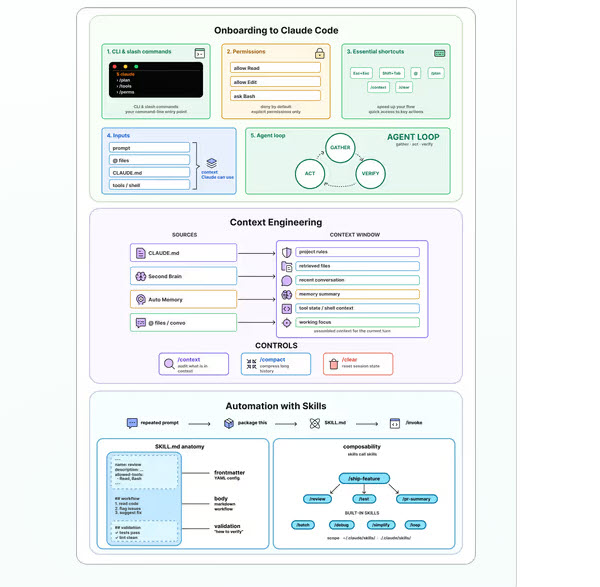
Visual diagrams for Claude Code onboarding, context engineering, and automation with skills.
Assignments
Self-paced
Recorded walkthrough + solution included
Practice the Foundations
Onboard to a New Codebase
Point Claude Code at an unfamiliar repo
Use plan mode to explore before acting
Produce a useful artifact: roast, architecture doc, onboarding guide, or test gap analysis
Verification
CLAUDE.md (the mesh walkthrough)
Initialize CLAUDE.md
Write canonical patterns and migrate the legacy code
Build a search feature from a senior-engineer spec on clean conventions
Translate a designer email (violet/lime accents) into a durable rule
Skill from a real workflow (log triage)
Take stock of a UI-only log archive and identify the automation gap
Add an API endpoint to expose the tool to Claude
Author a markdown report template using documented placeholders
Run the pipeline manually: curl → parse → filter → categorize → aggregate → render
Wrap the entire flow as a new skill: /triage-logs
Run the skill on a fresh log with no re-prompting
Visual diagrams for onboarding to a new codebase, a CLAUDE.md walkthrough, and packaging log triage as a skill.
Session 2
Live
Scaling Up with MCPs, Parallel Agents, and Agentic Engineering
MCPs, CLIs, and Agentic Tooling
Model Context Protocol (MCP) and installation
When NOT to use MCP (token cost, output limits, signal-to-noise)
Browser automation with /chrome (navigate, screenshot, read console, record GIFs)
The self-correcting chain (build → screenshot → detect → fix → verify, no human in the middle)
Agentic engineering
Hook lifecycle
Parallel Development and Agentic Validation
Git worktrees with claude –worktree for safe parallel isolation
The multi-agent workflow (managing a team of Claudes)
Subagents (centralized, lower-cost) vs Agent Teams (peer-to-peer, higher-cost)
Notification hooks (Notification, Stop, SubagentStop, StopFailure)
/chrome in parallel workflows for automated visual regression
The Five Pillars of Agentic Engineering
Common challenges at scale (context bloat, skill explosion, review bottleneck, friction points, evaluation gaps, you-as-the-bottleneck)
Techniques to build at scale
Compound engineering
Auditing your codebase for AI-readiness
Designing harnesses to eliminate friction
Visual diagrams for MCP and self-correcting chains, parallel development, and making agentic engineering real.
Assignments
Self-paced
Recorded walkthrough + solution included
Build at Scale
Connect Claude to the Real World with MCPs
Install MCP servers (Figma, Blender, Slack, or Notion)
Build a tool that reads from and writes to an external system via MCP
Add validation hooks that check the tool’s output automatically
Use /chrome to visually verify the built interface or output
Build a Full-Stack App in Parallel
Set up a shared CLAUDE.md with stack, ports, and API contract
Run Claude instances simultaneously in separate worktrees (backend, frontend, tests)
Decompose a full-stack app into independent tasks suitable for parallel agents
Merge worktree branches together, resolving at least one conflict in the process
Use /chrome to validate the merged frontend renders and functions correctly
Capstone
Pick a project you actually want to ship: your own repo, a side project, or one of three starter PRDs (CodeCoach, Korridor, or Wordle iOS). Your stack, your language.
Write a CLAUDE.md, scope .claude/rules/, and build a Second Brain so Claude never has to ask for context.
Set up a validation harness with tests, linting, hooks, and /chrome so Claude can self-check and self-correct.
Wire up agentic tooling, including MCPs, 2–3 reusable skills, and project slash commands that help your agents do more on your behalf.
Define agent team roles and accelerate your development workflow.